FlexClip Review 2026: Is the AppSumo Deal Worth It?
We may earn a commission if you buy through our links, at no extra cost to you. Our verdict was written first.
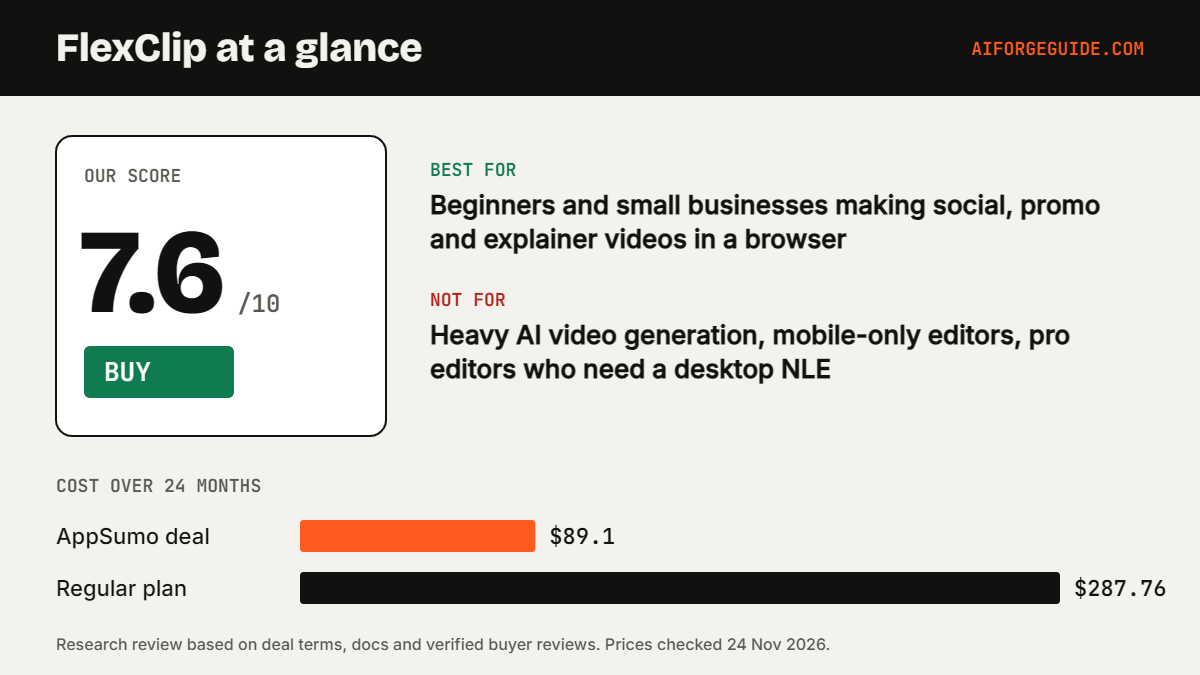
Our verdict · research review
BUY
FlexClip is a beginner-friendly browser video editor with AI extras. The AppSumo deal is good value for editing, but its AI credits are one-time, not monthly.
At a glance
Short answer: FlexClip is a browser-based video editor with templates, a large stock library and AI tools such as text-to-video, auto subtitles and text-to-speech. The AppSumo lifetime deal costs $89.10 for one code during the Black Friday sale ($99 list), and it suits beginners and small businesses who mostly edit, rather than generate, videos. The big catch: the AI credits in the deal are a one-time lifetime pool (3,000 on one code), not a monthly refill, and only 20% of them arrive before the 60-day refund window ends.
This review is based on the AppSumo deal terms, the tool’s docs and demos, and 3,117 user reviews on AppSumo and Trustpilot, checked on 24 November 2026. We have not used FlexClip long-term, so the score is an editorial judgment from that research. You can read more about our process on how we test.
Key facts
| Fact | Detail |
|---|---|
| What it does | Online video editor with templates, stock media and AI tools (text-to-video, subtitles, TTS, AI images, avatars) |
| Best for | Beginners, marketers and small businesses making social, promo and explainer videos |
| Not for | People who need lots of AI generation every month, mobile-only editing, or pro desktop editing |
| AppSumo price | $89.10 / $178.20 / $267.30 for 1, 2 or 3 stacked codes (Black Friday, 10% off $99 / $198 / $297) |
| Regular price | Plus/Pro $11.99/mo and Business $19.99/mo, both billed annually |
| Refund window | 60 days (AppSumo “We Got Your Back”); redeem codes within 60 days |
| Rating on AppSumo | 4.6/5 from 511 reviews |
| Trustpilot | 4.5 from 2,606 reviews |
| Last checked | 24 November 2026 |
FlexClip lifetime deal from $89.10
$89.10 (1 code, Black Friday price): one payment on AppSumo instead of $287.76 on Plus/Pro billed annually over 24 months. Black Friday price, ends 1 Dec 2026. Refund window: 60 days.
What FlexClip does
FlexClip is a video editor that runs in your browser. You start from a blank timeline or one of its templates, drop in your own clips or stock footage, add text, music and transitions, and export. There is nothing to install, which is a big part of the appeal for people who find Premiere or DaVinci Resolve intimidating.
The company behind it, PearlMountain, has been around since 2006, so this is not a new startup that might vanish next year. That matters more than usual for a lifetime deal.
On top of the editor sits a growing set of AI tools. FlexClip’s founder updates on AppSumo list text-to-video, AI subtitles, text-to-speech, AI images, PPT-to-video, AI logo animation, AI avatars and long-video-to-shorts. These tools spend AI credits. The editor itself does not.
The problem it solves is simple: you need a decent-looking promo, tutorial or social clip today, you are not a video editor, and you do not want a monthly bill for a tool you open twice a week.
How to use FlexClip: step by step
- Buy and redeem the code. After purchase, redeem the AppSumo code within 60 days. You need a FlexClip account; the deal is open to new users and returning AppSumo buyers.
- Set up your Brand Kit. Upload your logo, brand colors and custom fonts. All three tiers include Brand Kit and custom font uploads.
- Pick a starting point. Choose a template, start a blank project, or use an AI tool such as text-to-video or PPT-to-video to build a first draft.
- Edit on the timeline. Trim clips, add stock video and music, place text and transitions. FlexClip’s Q&A says trimming and screen recording happen through the Media panel and the timeline.
- Add subtitles and voice. Run AI subtitles on your voiceover, or generate a voice with text-to-speech. The support team notes that auto subtitles can fail when there are several audio tracks, background music, or clips over 20 minutes, so add music after captioning.
- Export. Download in 1080p (Tier 1) or 4K (Tiers 2 and 3), with no watermark, or host the video on FlexClip’s own video hosting.
There is no standalone mobile app. The Q&A says editing needs a computer browser.
FlexClip AI video editor features that matter
The timeline editor and templates
This is the core of the product and the part buyers praise most. Trustpilot reviewers repeatedly describe it as easy for beginners, and one compares it to “Canva, but for video.” Tier 1 lets you save up to 100 templates; Tiers 2 and 3 allow 200.
Stock media library
All tiers include premium resources, but Tier 1 caps stock videos and audio at 5 per project. Tiers 2 and 3 make that unlimited. If you build videos mainly from stock footage, that single limit is the best reason to buy two codes.
AI tools and the credit pool
Text-to-video, AI images, TTS, subtitles, avatars and the rest draw from AI credits. On the deal you get 3,000 (1 code), 7,000 (2 codes) or 12,000 (3 codes). These are lifetime and non-recurring. For comparison, FlexClip’s own pricing article lists 3,600 credits per year (300 a month) on the annual Pro plan. So one code gives you less than a year of a subscriber’s AI allowance, once.
Credit size is also the most common complaint on Trustpilot, where several reviewers say the “coins” run out fast and that premium elements feel like upsells.
Export quality and length
Tier 1 exports 1080p Full HD; Tiers 2 and 3 export 4K. All tiers have unlimited video length, unlimited saved projects and no watermark.
Storage and hosting
Tier 1 includes 30 GB cloud storage and 100 GB video hosting. Tiers 2 and 3 include 100 GB storage and 1 TB hosting. That is plenty for a small business, but if you keep raw footage in FlexClip, 30 GB fills up.
Commercial and reseller rights
The deal includes commercial use and reseller rights, which matters if you make videos for clients.
FlexClip pricing and lifetime deal: which tier to buy
| Tier | Deal price (BF) | List | Export | Stock per project | Storage / hosting | AI credits (one-time) |
|---|---|---|---|---|---|---|
| 1 code | $89.10 | $99 | 1080p | 5 | 30 GB / 100 GB | 3,000 |
| 2 codes | $178.20 | $198 | 4K | Unlimited | 100 GB / 1 TB | 7,000 |
| 3 codes | $267.30 | $297 | 4K | Unlimited | 100 GB / 1 TB | 12,000 |
Terms worth reading twice: you can stack up to 3 codes; Tier 1 maps to FlexClip’s Plus plan and Tiers 2 and 3 to Business; 20% of AI credits are available right away and the other 80% arrive 60 days after redemption.
Pricing math over 24 months. FlexClip’s pricing article lists Pro at $11.99 a month and Business at $19.99 a month, billed annually. Monthly-billing prices were not shown.
- Plus/Pro for 24 months: $11.99 x 24 = $287.76, versus $89.10 for one code. You save about $198.
- Business for 24 months: $19.99 x 24 = $479.76, versus $178.20 for two codes. You save about $301.
The catch is that a subscriber also gets fresh AI credits every month (7,200 over two years on Pro, by FlexClip’s own figure), while your deal credits never refill. If you mostly edit, the deal wins easily. If you plan to generate a lot of AI video, the math gets closer than the headline suggests.
Our pick: two codes ($178.20). Unlimited stock per project and 4K export are the upgrades you will actually feel. Three codes only makes sense if you know you will burn through AI credits. You can browse other current offers on our deals page.
Check the FlexClip tiers on AppSumo
Pick your tier, then test it
Buy the tier that matches your use above; you can stack or upgrade later where the deal allows. Refund window: 60 days.
Pros and cons
Pros
- Very easy for beginners; this is the most repeated praise on both AppSumo and Trustpilot
- Large template and stock library, with unlimited stock per project from Tier 2
- No watermark, unlimited video length and commercial plus reseller rights on every tier
- Up to 3 codes stack, so you can buy one now and add more later
- 60-day refund window and an established company behind it
- Steady feature updates in 2026 (AI avatars, long-to-shorts, PPT-to-video)
Cons
- AI credits are one-time on the deal, and 80% are held back until day 60
- Tier 1 limits stock to 5 items per project and exports only in 1080p
- Buyers report occasional slow rendering, export or upload glitches
- No mobile app; you need a computer browser
- Auto subtitles struggle with multiple audio tracks, background music or clips over 20 minutes
- Trustpilot has a cluster of complaints about auto-renewal and refunds on regular subscriptions (not the AppSumo deal, but it shows how support handles billing)
Who should buy it, and who should skip it
Buy it if you make a handful of social clips, product promos, tutorials or slideshow-style videos each month, you are not a trained editor, and you want to stop paying for an editor you use lightly. Small businesses, course creators and solo marketers fit well.
Skip it if your main goal is AI-generated video at volume. The credit pool will run dry, and you would be better served by a tool built around generation with a monthly allowance. Skip it too if you edit long-form YouTube videos with complex audio, or if you only work on a phone.
On the “buy” list? Get it at the deal price
The deal price beats $287.76 on Plus/Pro billed annually over 24 months. Refund window: 60 days.
FlexClip alternatives
- CapCut: pick it if you edit on your phone or want strong free tools for short-form social video.
- Canva: pick it if you already pay for Canva and only need simple video alongside your graphics.
- DaVinci Resolve: pick it if you want a free, professional desktop editor and are willing to learn it.
We did not confirm current prices for these alternatives on 24 November 2026, so check their sites before comparing.
Our verdict
FlexClip is a solid, beginner-friendly editor from a company that has been around long enough to trust with a lifetime deal, and at $89.10 to $178.20 it costs less than a single year of the subscription. We would buy two codes for the 4K export and unlimited stock. Just treat the AI credits as a bonus, not the reason to buy. If you need AI video generation every week, the one-time credit pool is the wrong fit; if you need a good editor without a monthly bill, this is an easy yes.
Last checked: 24 November 2026
Our verdict · 7.6/10 · BUY
Get FlexClip while it is a one-time price
You pay once instead of every month. Refund window: 60 days.
Affiliate link: we may earn a commission at no extra cost to you. Deal: $89.10 (1 code, Black Friday price). Black Friday price, ends 1 Dec 2026. Price checked 24 Nov 2026.FAQ
Is FlexClip worth it?
For light-to-moderate editing, yes. The AppSumo deal costs less than one year of the Plus/Pro plan and removes the monthly bill. It is less worth it if you mainly want AI-generated video, because the deal’s AI credits do not refill.
Is the FlexClip lifetime deal legit?
Yes. It is an AppSumo Select listing with a 60-day refund window, 511 reviews averaging 4.6, and over 16,000 buyers. FlexClip itself has 2,606 Trustpilot reviews averaging 4.5.
Do FlexClip AppSumo AI credits renew every month?
No. The deal terms say the AI credits are lifetime and non-recurring: 3,000, 7,000 or 12,000 depending on the number of codes. Only 20% arrive at redemption; the rest arrive 60 days later.
Can I stack FlexClip codes?
Yes, up to 3 codes. Two codes add 4K export, unlimited stock per project, 100 GB storage and 7,000 AI credits. Older (pre-2025) deal owners have their own upgrade path listed on the deal page.
Does FlexClip have a mobile app?
Not a standalone one. FlexClip’s answer on AppSumo says creating and editing videos needs a computer browser.
What is the best FlexClip alternative?
For phone editing and short-form social video, CapCut. For graphics plus simple video, Canva. For free professional editing, DaVinci Resolve. For more ways to try tools cheaply, see our free credits guide.
Does the FlexClip free plan have a watermark?
Yes. FlexClip’s own pricing article says the free plan exports at 720p with a watermark. Every AppSumo tier removes it: one code exports in 1080p Full HD and two or three codes export in 4K, all with unlimited video length and no watermark.
How much does FlexClip cost?
FlexClip’s pricing article lists Pro at $11.99 a month and Business at $19.99 a month, both billed annually; monthly-billing prices were not shown. The AppSumo lifetime deal costs $89.10, $178.20 or $267.30 for 1, 2 or 3 stacked codes in the Black Friday sale.
What AI tools does FlexClip include?
FlexClip’s 2026 updates list text-to-video, AI subtitles, text-to-speech, AI images, PPT-to-video, AI logo animation, AI avatars and long-video-to-shorts. These spend AI credits, while the editor itself does not. On the deal you get 3,000, 7,000 or 12,000 lifetime credits that do not refill.
Can I use FlexClip videos commercially?
Yes. The AppSumo deal includes commercial use and reseller rights on every tier, which matters if you make videos for clients or sell video work. All tiers also export without a watermark and with unlimited video length, so client deliverables carry no FlexClip branding.