
RobinReach Review 2026: Is the AppSumo Deal Worth It?
We may earn a commission if you buy through our links, at no extra cost to you. Our verdict was written first.
Our verdict · research review
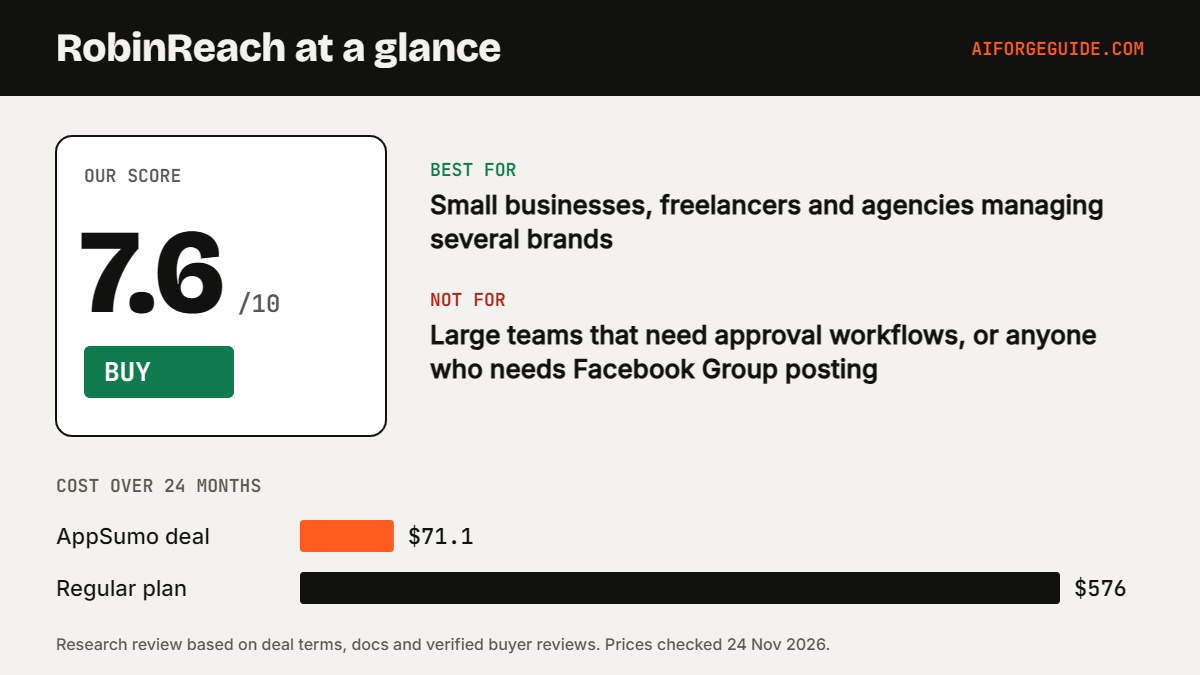
BUY
RobinReach schedules posts to 13 networks, writes them with AI and automates comment-to-DM replies. The AppSumo deal beats the subscription by a wide margin, but Tier 1 has no X account.
At a glance
AppSumo deal
Price checked 24 Nov 2026
Short answer: RobinReach is a social media management tool from a small London team that schedules and publishes to 13 platforms, writes posts and images with AI, turns RSS feeds and store products into posts, and runs comment-to-DM automations, with a unified inbox and analytics. The AppSumo lifetime deal costs $71.10 to $656.10 across four tiers in the Black Friday sale, against $9 to $99 a month on the regular plans. It suits small businesses, freelancers and agencies juggling several brands. The big catch: limits were cut when the deal relaunched in June 2026, and Tier 1 includes no X (Twitter) account at all.
This review is based on the AppSumo deal terms, the tool’s docs and demos, and 145 user reviews on AppSumo (131) and Trustpilot (14), checked on 24 November 2026. We have not used RobinReach long-term, so our score is an editorial judgment from that research. Our how we test page explains the method.
Key facts
| Fact | Detail |
|---|---|
| What it does | Schedules and publishes to 13 social platforms, AI posts and images, RSS and store automation, comment-to-DM, unified inbox |
| Best for | Small businesses, solo marketers and agencies running several brands |
| Not for | Large teams that need approval workflows; Facebook Group posting |
| AppSumo price | 4 tiers: $71.10 / $161.10 / $341.10 / $656.10 (Black Friday, 10% off list) |
| Regular price | Sprout $9/mo, Bloom $24/mo, Thrive $49/mo, Scale $99/mo (cheaper billed yearly) |
| Refund window | 60 days |
| Rating on AppSumo | 4.7/5 from 131 reviews |
| Trustpilot | 4.2/5 from 14 reviews |
| Last checked | 24 November 2026 |
RobinReach lifetime deal from $71.10
$71.10 (Tier 1); $161.10 (Tier 2, our pick): one payment on AppSumo instead of $576 on Bloom at $24/mo over 24 months. Refund window: 60 days.
What RobinReach does: social media management in one dashboard
If you post for more than one brand, the daily routine is painful: write a caption, make an image, log into five apps, post, then come back later to answer comments. Schedulers like Buffer and Hootsuite fixed the posting part years ago. RobinReach bundles the rest into the same dashboard at a lower price.
You connect your accounts (Facebook, Instagram, X, LinkedIn, YouTube, TikTok, Pinterest, Threads, Bluesky, Mastodon, Telegram, Google Business Profile and WordPress), group them into brands with their own tone and mission, and plan posts on a calendar. AI writes captions, and the built-in image tool, RobinPixel, makes images up to 4K. RSS feeds and Shopify, WooCommerce or Etsy products can turn into posts automatically.
The 2026 additions push it toward engagement, not just publishing. The Black Friday founder post lists rebuilt analytics, comment-to-DM automations (someone comments a keyword, they get a DM), a link-in-bio page, Google Drive integration and Social Import of up to 300 existing posts. There is also a REST API and native MCP support, so AI agents can post through it.
How to use RobinReach: step by step
These steps come from the AppSumo deal terms and the vendor’s answers in the deal Q&A.
- Buy a tier and activate it. Activate within 60 days of purchase. You can upgrade while the deal is live and downgrade within 60 days.
- Create a brand. Add the brand’s name, tone and mission so the AI writes in the right voice. Higher tiers allow more brands.
- Connect social profiles. Link Pages, Instagram Business accounts, LinkedIn, TikTok and the rest. Facebook Groups are not supported because Facebook has no official Groups API.
- Import or create content. Write a post, ask the AI to draft one, generate an image in RobinPixel, or bulk upload posts from a CSV file.
- Schedule on the calendar. Pick times per network, including Stories and Reels.
- Set up automation. Add an RSS feed or connect a store so new items become posts, and create comment-to-DM rules.
- Work the inbox and analytics. Reply to comments, DMs and reviews from the unified inbox, and check results in analytics (PDF reports on Tiers 3 and 4).
Features that matter
Publishing to 13 platforms
The network list is wide, including Bluesky, Mastodon, Threads, Telegram, Google Business Profile and WordPress, which some older schedulers still skip. Profile limits run from 5 (Tier 1) to 200 (Tier 4). X is the exception: Tier 1 gets no X accounts, Tier 2 gets 1, Tier 3 gets 3 and Tier 4 gets 10. The deal page does not explain why, but plan for it.
AI posts and RobinPixel images
AI text posts run 200 a month on Tier 1, 500 on Tier 2 and unlimited on Tiers 3 and 4. AI images run 20, 50, 100 and 500 a month. Twenty images a month is thin if you post daily with fresh visuals, so most active users will still use Canva or a similar tool for some graphics.
Comment-to-DM automations
You get 3, 10, 30 or 100 automations by tier. For creators and shops that run “comment GUIDE to get the link” posts, this replaces a separate tool like ManyChat for simple flows.
RSS and repurposing
RSS feeds: 1, 5, 10 or unlimited (the founder’s June post says 1, 3, 10 or unlimited, so the table and post disagree). Repurposing tasks: 1, 3, 10 or unlimited a month.
Unified inbox and analytics
Comments, DMs and reviews land in one inbox. Analytics are basic on Tier 1, advanced on Tier 2, and advanced with PDF export on Tiers 3 and 4. A Trustpilot reviewer noted LinkedIn personal-profile analytics are missing; the company blamed LinkedIn’s API and says support is planned.
API and MCP
A REST API and native MCP support are listed, which matters if you already automate with n8n or an AI agent. A Trustpilot reviewer praised the n8n integration.
RobinReach pricing and lifetime deal: which tier to buy
| Tier 1 | Tier 2 | Tier 3 | Tier 4 | |
|---|---|---|---|---|
| Deal / list price | $71.10 / $79 | $161.10 / $179 | $341.10 / $379 | $656.10 / $729 |
| Maps to plan | Sprout | Bloom | Thrive | Scale |
| Brands / members | 2 / 1 | 5 / 5 | 15 / 15 | Unlimited / unlimited |
| Social profiles | 5 | 15 | 40 | 200 |
| X accounts | 0 | 1 | 3 | 10 |
| AI text posts / images per month | 200 / 20 | 500 / 50 | Unlimited / 100 | Unlimited / 500 |
| Comment-to-DM automations | 3 | 10 | 30 | 100 |
| Media library | 5 GB | 15 GB | 50 GB | 100 GB |
All tiers get lifetime access and all future updates for their plan. No stacking.
The math over 24 months, using RobinReach’s own pricing page:
- Tier 1 vs Sprout: 24 x $9 = $216 monthly, or $198 on yearly billing ($99 a year). Tier 1 at $71.10 saves about $127 to $145.
- Tier 2 vs Bloom: 24 x $24 = $576, or $398 yearly. Tier 2 at $161.10 saves $237 to $415.
- Tier 3 vs Thrive: 24 x $49 = $1,176, or $798 yearly. Tier 3 at $341.10 saves $457 to $835.
- Tier 4 vs Scale: 24 x $99 = $2,376, or $1,996 yearly. Tier 4 at $656.10 saves $1,340 to $1,720.
Our recommendation: Tier 2 for most buyers. It adds an X account, five brands, five members and 15 profiles, which covers a small business with a side brand or a freelancer with a few clients. Tier 1 only makes sense if you never post to X. Agencies with 10+ clients should look at Tier 3; AppSumo marks Tier 4 as recommended, and it is the best saving in dollar terms, but only buy it if you will actually manage dozens of profiles.
For other marketing deals in the Black Friday sale, see our deals page.
Pick your tier, then test it
Buy the tier that matches your use above; you can stack or upgrade later where the deal allows. Refund window: 60 days.
Pros and cons
Pros
- 13 platforms, including Bluesky, Mastodon, Threads, Telegram and Google Business Profile.
- 4.7 from 131 AppSumo reviews; 115 are five tacos and only 7 are one or two.
- Unified inbox, comment-to-DM and RSS/store automation on top of scheduling.
- Trustpilot reviewers repeatedly praise fast, responsive support; the company answers negative reviews within about a day.
- REST API and MCP support for automation.
- Original buyers were grandfathered when limits changed, per the founder.
Cons
- The June 2026 relaunch lowered limits for social profiles, AI images and RSS feeds; AppSumo’s review summary flags this as the main complaint.
- No X account on Tier 1.
- Facebook Groups cannot be posted to.
- 20 AI images a month on Tier 1 is low.
- A Trustpilot reviewer says the team model lacks approval workflows.
- One Trustpilot complaint about an unexpected plan upgrade charge (the company says it refunded in full).
- Conflicting numbers on the deal page (brand count in the widget, RSS limits in the founder post).
- Small, bootstrapped team of 1 to 10 people.
Who should buy it, and who should skip it
Buy it if you run social for a small business or a handful of clients and want scheduling, AI drafting and an inbox in one place without $50 to $100 a month in subscriptions. It is a strong fit for shops on Shopify, WooCommerce or Etsy, since products can become posts.
Skip it if you are a larger team that needs approval chains before anything goes live, or if Facebook Groups are central to your marketing. Skip Tier 1 if X matters to you.
On the “buy” list? Get it at the deal price
The deal price beats $576 on Bloom at $24/mo over 24 months. Refund window: 60 days.
RobinReach alternatives
- Buffer: Pick it if you want a long-established scheduler with a free plan and do not need comment-to-DM or store automation.
- AdaptlyPost: Pick it if you want another AppSumo lifetime scheduler with AI captions and agent access, and more profiles per dollar at entry level.
- Hootsuite: Pick it if you need enterprise features such as approvals, social listening and big-team permissions, and have the budget for it.
Our verdict
RobinReach is a lot of tool for the money. Thirteen networks, AI posts, an inbox, comment-to-DM and an API for the price of six or seven months of its own Bloom plan is a good deal by any measure, and the review record is clean. The relaunch trimmed limits, and the missing X account on Tier 1 is an annoying gotcha, so read the table before you click. Buy Tier 2 unless you know you need more, and use the 60-day window to connect every account you care about. Get RobinReach on AppSumo.
Last checked: 24 November 2026
Our verdict · 7.6/10 · BUY
Get RobinReach while it is a one-time price
You pay once instead of every month. Refund window: 60 days.
Affiliate link: we may earn a commission at no extra cost to you. Deal: $71.10 (Tier 1); $161.10 (Tier 2, our pick). Price checked 24 Nov 2026.FAQ
Is RobinReach worth it?
For small businesses and freelancers posting across several networks, yes. Tier 2 at $161.10 replaces a $24-a-month Bloom plan, and you get a unified inbox and automations on top of scheduling.
Is the RobinReach lifetime deal legit?
Yes. It is an AppSumo Select deal with a 60-day refund, about 2,500 buyers and a 4.7 rating from 131 reviews. RobinReach first launched on AppSumo in February 2025 and relaunched in June 2026.
Does RobinReach support X (Twitter)?
Yes, but not on Tier 1. Tier 2 includes 1 X account, Tier 3 has 3 and Tier 4 has 10.
Can RobinReach post to Facebook Groups?
No. Facebook has no official Groups API. Facebook Pages and Instagram Business accounts are supported.
What did the 2026 relaunch change?
The founder acknowledged lower limits for social profiles, AI images and RSS feeds for new buyers, and said original buyers keep their old limits. New features include comment-to-DM, rebuilt analytics, a bio page and 4K images.
What is the best RobinReach alternative?
Buffer for simple scheduling with a free plan, AdaptlyPost for another lifetime-deal scheduler, Hootsuite for enterprise teams.
How much does RobinReach cost?
RobinReach’s pricing page lists Sprout at $9 a month, Bloom at $24, Thrive at $49 and Scale at $99, or $99, $199, $399 and $998 a year. The AppSumo lifetime deal maps to those plans and costs $71.10, $161.10, $341.10 or $656.10 once in the Black Friday sale.
Which platforms does RobinReach support?
Thirteen: Facebook, Instagram, X, LinkedIn, YouTube, TikTok, Pinterest, Threads, Bluesky, Mastodon, Telegram, Google Business Profile and WordPress. Shopify, WooCommerce and Etsy products can also become posts automatically. Facebook Groups are not supported because Facebook has no official Groups API, and Tier 1 includes no X account.
Is RobinReach a cheaper Hootsuite alternative?
For small teams, it can be. RobinReach bundles scheduling, AI posts, a unified inbox and comment-to-DM at a lower price, and the lifetime deal removes the monthly fee. But Hootsuite still fits teams that need approvals, social listening and big-team permissions, and a Trustpilot reviewer says RobinReach lacks approval workflows.