

VistaCreate Review 2026: Is the AppSumo Deal Worth It?
We may earn a commission if you buy through our links, at no extra cost to you. Our verdict was written first.
Our verdict · research review
BUY
VistaCreate is a template-first design tool from the VistaPrint family. The AppSumo deal gives lifetime Pro with 10 seats for about $98, but its Trustpilot page tells a messier story.
At a glance
AppSumo deal
Price checked 24 Nov 2026
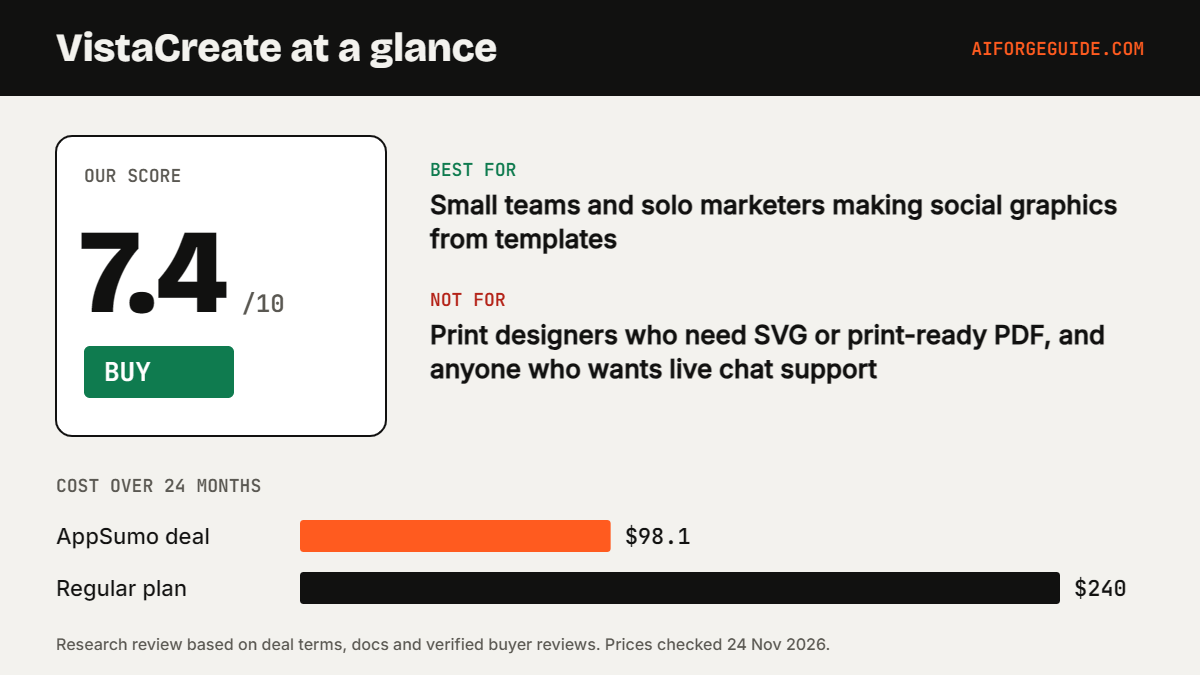
Short answer: VistaCreate is a browser and mobile design tool, built on the old Crello product and now part of the VistaPrint family, that makes social posts, ads, flyers and short animated graphics from 200,000+ templates, with AI tools for image generation, background removal and copy. The AppSumo deal is a single lifetime Pro plan for $98.10 during the Black Friday sale ($109 list), and it covers up to 10 seats. It suits small teams and solo marketers who build graphics from templates every week. The big catch: VistaCreate’s Trustpilot score is 3.4 out of 5, mostly from billing and support complaints, and the export options are thin for print work.
This review is based on the AppSumo deal terms, the tool’s docs and demos, and 1,265 user reviews on AppSumo (370) and Trustpilot (895), plus the G2 and Capterra listings, checked on 24 November 2026. We have not used VistaCreate long-term, so the score below is an editorial judgment from that research. Our method is on the how we test page.
Key facts
| Fact | Detail |
|---|---|
| What it does | Template-based online design editor with AI image, text and photo tools, brand kits and social scheduling |
| Best for | Small teams, social media managers, solo founders making frequent graphics |
| Not for | Print and vector work (no SVG export), teams that need live support |
| AppSumo price | One plan: $98.10 in the Black Friday sale ($109 list), not stackable |
| Regular price | Pro $10/mo on VistaCreate’s plans page; some third-party sites list $13/mo |
| Refund window | 60 days (AppSumo “We Got Your Back”) |
| Rating on AppSumo | 4.42/5 from 370 reviews |
| Trustpilot | 3.4/5 from 895 reviews |
| Last checked | 24 November 2026 |
VistaCreate lifetime deal from $98.10
$98.10 (single plan, Black Friday price): one payment on AppSumo instead of $240 on Pro at $10/mo over 24 months. Black Friday price, ends 1 Dec 2026. Refund window: 60 days.
What VistaCreate does: a Canva-style design editor
VistaCreate is a Canva-style editor. You pick a format (Instagram post, story, Facebook ad, flyer, poster and so on), start from a template or a blank canvas, swap the text and images, and download or schedule the result. The company says it has more than 21 million users and has been around since 2016, first as Crello under Depositphotos and now inside the VistaPrint family.
The problem it solves is simple: people who are not designers need a steady supply of decent-looking graphics, fast. The template library does most of the heavy lifting. The Pro plan adds the parts that save real time once you publish a lot: unlimited brand kits, one-click resizing between formats, version history, HD downloads and the AI tools.
The AI side has grown in 2026. VistaCreate’s own guide lists an AI Assistant that builds a design from a plain-language description, an AI Writer for copy (generate, rewrite, translate, change tone), an AI Image Generator, a Background Remover, a background replacer, an object remover and a Sticker Maker. None of this is unique in the category, but it all sits inside the same editor, which is the point.
How to use VistaCreate: step by step
These steps come from VistaCreate’s official “how to use” guide and the AppSumo redemption terms.
- Buy and redeem the code. After purchase, AppSumo gives you a code. You must redeem it within 60 days of buying. The deal works for new and existing VistaCreate accounts.
- Sign in and confirm Pro. Create or log in to your account at create.vista.com and apply the code so the account shows the Pro plan.
- Set up a Brand Kit. Save your logo, brand colors and fonts. Pro allows unlimited brand kits, which matters if you run several clients or products.
- Pick a format. Choose the output type, such as an Instagram post, story, flyer or poster.
- Choose a starting point. Browse templates by format or topic, upload your own photo, or describe what you want to the AI Assistant and let it draft a layout.
- Edit the design. Replace the text, images and colors. Use the photo tools to crop, adjust and filter, and the AI tools to remove a background or generate an image.
- Resize for other channels. Use the one-click resizer to turn one design into other formats instead of rebuilding it.
- Download or schedule. Export as JPG, PNG, PDF, MP4 or GIF, or connect an account and schedule the post. Scheduling covers Facebook, Instagram and Pinterest.
Features that matter
Templates and stock library
The deal page lists 200,000+ design templates and 170 million+ photos, videos and vectors. For comparison, the free Starter plan gets 100,000 templates and about 1 million stock assets, so the stock library is the biggest jump you pay for. Several AppSumo reviewers name the template library as the main reason they bought.
AI Assistant and AI Writer
The AI Assistant turns a text description into a draft design, and the AI Writer handles headlines and captions inside the editor. VistaCreate’s press release from June 2026 says the Writer covers copy generation, rewriting, translation and tone changes. Treat both as a fast first draft. Neither replaces a designer or a copywriter.
AI Image Generator and photo tools
Pro includes an AI Image Generator capped at up to 100 generations per month, according to VistaCreate’s guide. The background remover, background replacer and object remover are the tools most small sellers will use daily, especially for product photos. The plans page does not publish separate limits for the background tools, so we could not confirm whether they are capped.
10 seats and brand kits
This is the strongest line in the deal. Pro supports up to 10 team members on one account, and the AppSumo plan keeps that. A small agency or a marketing team of four can share one $98 purchase. Unlimited brand kits make it practical to keep client identities apart.
Social scheduling
You can schedule straight to Facebook, Instagram and Pinterest. That is a short list. If you also post to LinkedIn, TikTok or X, you will still need a separate scheduler.
Storage and exports
Pro gives unlimited project storage (Starter is 10 GB). Exports are JPG, PNG, PDF, MP4 and GIF. A Trustpilot reviewer pointed out that SVG and print-ready PDF are missing, which is a real gap if you design for print.
VistaCreate pricing and lifetime deal: what you get
There is only one plan, so the choice is “buy or not”.
| Plan | Deal price | List price | What you get |
|---|---|---|---|
| Single plan (lifetime) | $98.10 | $109 | Pro features, 10 seats, 200k+ templates, 170M+ stock assets, unlimited storage, brand kits, scheduling, AI tools, HD download, all future Pro updates |
The math over 24 months. VistaCreate’s plans page lists Pro at $10 per month. Two years of Pro costs 24 x $10 = $240. The deal costs $98.10 once, so you save about $142 over two years, and the deal pays for itself after roughly 10 months. If the monthly price is really $13, as some third-party pricing sites show, two years would cost $312 and the gap gets wider. On annual billing (VistaCreate advertises a 23% saving), the break-even moves out a little, to about a year.
The terms that matter. Codes are not stackable, so there is nothing to upgrade to. You get “all future Pro Plan updates”, and if the plan name changes, the deal maps to the new name. You have 60 days to redeem and 60 days to ask for a refund.
Our recommendation: Buy one code if you will use the 10 seats or design at least weekly. If you make a graphic once a month, the free Starter plan is probably enough, and you should keep your $98. If you are collecting deals this week, our deals page and AI coupon codes guide cover the rest of the Black Friday sale.
Pick your tier, then test it
Buy the tier that matches your use above; you can stack or upgrade later where the deal allows. Refund window: 60 days.
Pros and cons
Pros
- Lifetime Pro with up to 10 seats for under $100, which is rare for a design tool from an established company.
- Large template and stock library; AppSumo’s review summary says buyers praise the interface and how quickly they get professional-looking designs.
- AI tools (design assistant, writer, image generator, background and object removal) inside the same editor.
- Unlimited brand kits and unlimited storage on the deal.
- Backed by a company that has run since 2016, which lowers the “will it shut down” worry that hangs over many lifetime deals.
- 16,000 buyers on AppSumo and a 60-day refund window.
Cons
- Trustpilot score of 3.4 from 895 reviews, with 17% one-star ratings.
- Trustpilot reviewers report charges after free trials and auto-renewal that kept switching back on (this concerns monthly subscriptions, not the AppSumo deal).
- Support is email only; there is no live chat or phone, and VistaCreate’s replies on Trustpilot often take over a month.
- Some users report editor lag, objects that will not select, and a slow undo.
- No SVG or print-ready PDF export.
- Scheduling only covers Facebook, Instagram and Pinterest; the image generator is capped at 100 a month.
- 25 of the 370 AppSumo reviews are one-taco ratings.
Who should buy it, and who should skip it
Buy it if you run social media for a small business, a shop or a handful of clients and make graphics most weeks. The 10 seats make it a team purchase at a solo price. It also fits people who already like Canva’s workflow but do not want another subscription.
Skip it if you design for print, need vector files, or rely on fast human support. Skip it too if you already pay for Canva Pro and are happy there; VistaCreate does the same job with a smaller ecosystem and fewer integrations, so switching only makes sense to drop the bill.
A word on the Trustpilot score. Read the complaints before you buy, but read them in context. Most one-star reviews are about subscriptions that renewed or trials that turned into charges. With a lifetime code there is no recurring charge to dispute. The complaints about slow email support still apply to you, though.
On the “buy” list? Get it at the deal price
The deal price beats $240 on Pro at $10/mo over 24 months. Refund window: 60 days.
VistaCreate alternatives
- Canva: Pick it if you want the largest template ecosystem, the most integrations and the best-known tool for team collaboration. It is a subscription, and its free plan is generous.
- Adobe Express: Pick it if your team already lives in Adobe apps and you want Adobe Fonts and stock in a template editor.
- Kittl: Pick it if your work leans toward logos, merch and typography-heavy designs rather than social posts.
Looking for free credits before paying for any design tool? See our free credits roundup.
Our verdict
VistaCreate is not the most exciting tool on AppSumo this week, and that is partly why we like the deal. It is a mature editor from a company with real staying power, and $98 for lifetime Pro with 10 seats beats two years of subscription by a wide margin. The weak spots are real: support is email-only and slow, exports stop short of print, and the Trustpilot page is full of angry subscription customers. A lifetime code sidesteps the billing problems, not the support ones. If you make social graphics weekly, especially as a small team, it is an easy buy. If you design for print or already pay for Canva and like it, pass. Get VistaCreate on AppSumo while the Black Friday price lasts.
Last checked: 24 November 2026
Our verdict · 7.4/10 · BUY
Get VistaCreate while it is a one-time price
You pay once instead of every month. Refund window: 60 days.
Affiliate link: we may earn a commission at no extra cost to you. Deal: $98.10 (single plan, Black Friday price). Black Friday price, ends 1 Dec 2026. Price checked 24 Nov 2026.FAQ
Is VistaCreate worth it?
For people who make social graphics often, yes. The lifetime deal costs $98.10, against $10 a month for Pro, so it pays for itself in about 10 months, and it includes up to 10 seats. For occasional use, the free Starter plan is enough.
Is the VistaCreate lifetime deal legit?
Yes. It is listed on AppSumo as an AppSumo Select deal with a 60-day refund window, it has 16,000 buyers, and VistaCreate’s general manager posted about the relaunch on the deal page. The deal includes all future Pro Plan updates.
Why is VistaCreate’s Trustpilot score so low?
It sits at 3.4 from 895 reviews. Most negative reviews describe charges after a free trial, auto-renewal that turned back on, and slow or unanswered refund emails. A smaller group mention editor bugs and missing export formats. Positive reviews praise the templates and ease of use.
Is VistaCreate better than Canva?
Not overall. Canva has a bigger ecosystem and rates higher on G2. VistaCreate is cheaper, has a solid template library, and the AppSumo deal removes the subscription, which is its main advantage.
Can I use VistaCreate with a team?
Yes. Pro supports up to 10 team members, and the AppSumo plan includes 10 account seats.
Can I stack VistaCreate codes on AppSumo?
No. It is a single plan and codes are not stackable.
Is VistaCreate the same as VistaPrint?
Not the same product. VistaCreate is an online design editor that is now part of the VistaPrint family. It started in 2016 as Crello under Depositphotos and says it has more than 21 million users. You use it to make social posts, ads, flyers and short animated graphics from templates.
How much does VistaCreate cost?
VistaCreate’s plans page lists a free Starter plan and Pro at $10 a month, with a 23% saving on annual billing and a 14-day trial. Some third-party sites list Pro at $13 a month. The AppSumo lifetime deal is a single Pro plan for $98.10 in the Black Friday sale, with up to 10 seats.
Is VistaCreate free?
Yes, the Starter plan is free. It includes 1 seat, 100,000 templates, about 1 million stock assets, 10 GB of storage and 1 brand kit. Pro adds 200,000+ templates, 170 million+ stock assets, unlimited storage and brand kits, one-click resizing and the AI tools.


