
MagicCanvas AI Review 2026: Is the AppSumo Deal Worth It?
We may earn a commission if you buy through our links, at no extra cost to you. Our verdict was written first.
Our verdict · research review
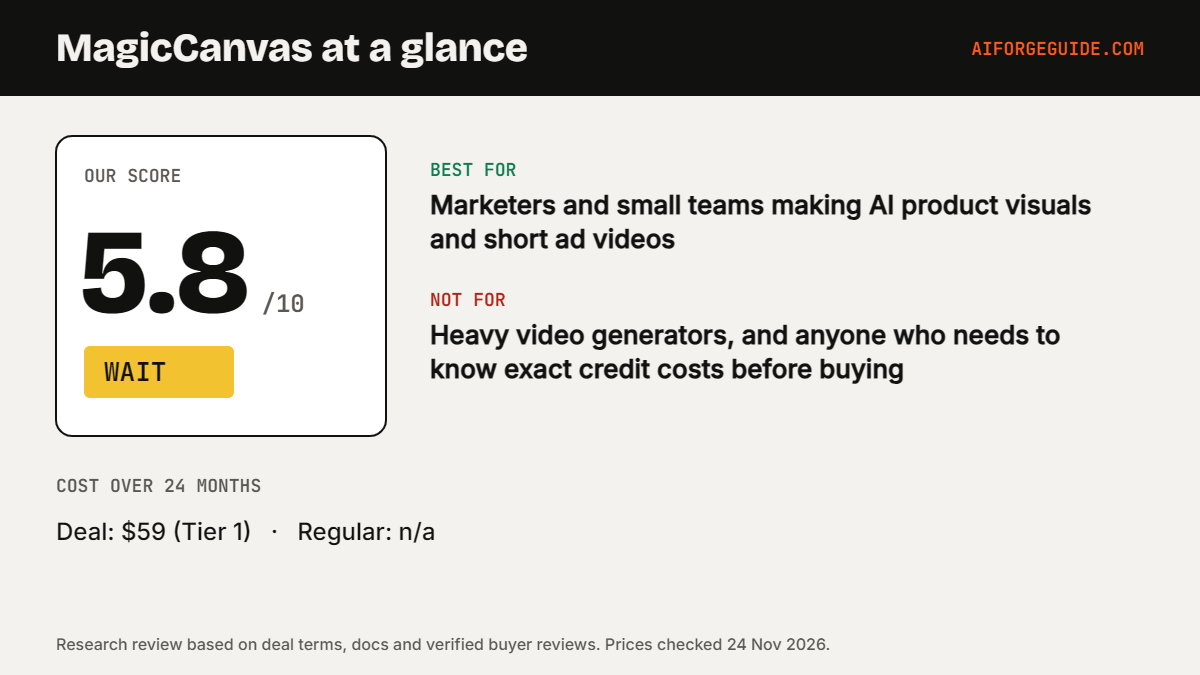
WAIT
MagicCanvas puts 16+ AI image, video and voice models on one node-based canvas. The AppSumo deal is cheap on paper, but credit costs per model are not published, so value is hard to judge.
At a glance
Short answer: MagicCanvas is a browser-based AI creative workspace from a San Francisco startup founded in February 2025: it puts 16+ image, video, voice and audio models (including Seedance, Wan, Kling, MiniMax, GPT Image and Nano Banana) and 30+ tools on a node-based canvas where you chain steps into reusable workflows. The AppSumo lifetime deal costs $59 for 125 credits a month, up to $699 for 1,600 credits a month. It suits marketers and small teams making AI product shots and short ad videos. The big catch: MagicCanvas does not publish how many credits each model or video costs, credits do not roll over, buyers say they run out fast, and the deal has only 18 reviews.
This review is based on the AppSumo deal terms, the tool’s docs and demos, and 18 user reviews on AppSumo, checked on 24 November 2026. MagicCanvas has no Trustpilot page and we found no G2 reviews. We have not used MagicCanvas long-term, so the score is an editorial judgment from that research. See how we test.
If you mainly want an AI product photo generator and editor, the editing tools section below matters more than the video models.
Key facts
| Fact | Detail |
|---|---|
| What it does | Node-based canvas for AI image, video, lip-sync, voice and editing tools, with saved workflows, Movie Studio and an AI agent |
| Best for | Marketers, e-commerce sellers and small creative teams |
| Not for | People who generate a lot of video, or who want a clear cost per clip |
| AppSumo price | 4 tiers: $59 / $199 / $399 / $699 |
| Regular price | Not published; the site shows no pricing page and the deal page’s struck-through prices are not labeled as regular plans |
| Refund window | 60 days |
| Rating on AppSumo | 4.3/5 from 18 reviews (209 buyers) |
| Trustpilot | No page |
| Last checked | 24 November 2026 |
Note: “Magic Canvas” is also a name used by other apps and a term in some games. This review covers MagicCanvas at magiccanvas.ai.
MagicCanvas lifetime deal from $59
$59 (Tier 1): one payment on AppSumo instead of n/a over 24 months. Refund window: 60 days.
What MagicCanvas does: AI product photos and video on one canvas
AI image and video models change every few weeks. Last month’s best video model is this month’s second-best, and each one lives on its own site with its own subscription. If you make visuals for ads or a store, you end up paying for three or four tools and moving files between them.
MagicCanvas bundles the models into one workspace. The homepage lists video models (Seedance, Wan, HappyHorse, MiniMax, Kling, Gemini Omni and Google Veo 3), image models (Qwen, Seedream, GPT Image and Nano Banana), talking-head and voice models (OmniHuman, MultiTalk, InfiniteTalk, Seed TTS and ElevenLabs) and audio models. You can switch models per task.
The canvas is the interesting part. Instead of a chat box, you place nodes (a prompt, a reference image, a tool such as background removal or upscaling, a video step) and connect them into a pipeline. Save it, and next time you only swap the product photo. The deal page also lists Movie Studio and a MagicCanvas Agent for longer productions, a Copilot assistant, asset management and version history. Tools include image-to-video, text-to-video, lip sync, background removal, AI Replace, Magic Eraser, AI Expansion, face swap, photo restoration, HD upscaling and “AI Wardrobe”.
How to use MagicCanvas: step by step
These steps come from the AppSumo deal page, its Q&A and the founder posts. We could not find an independent video walkthrough with enough detail to add more.
- Buy a tier and activate within 60 days. You can move between the four tiers later.
- Open MagicCanvas in your browser. There is nothing to install.
- Start from a template or a blank canvas. Video templates and saved workflows are listed among the features.
- Add your inputs. Drop in a prompt, product photos or a character reference as nodes.
- Pick a model for each step. Choose an image or video model per node. The app shows the exact credit cost before each generation, so check it before you run.
- Connect tools into a pipeline. Chain steps such as background removal, image-to-video, lip sync and upscaling.
- Generate, compare and retake. Run the workflow, compare results, and retake steps as needed. Every step and retake costs credits.
- Save the workflow and export. Save the pipeline as a reusable template. Exports have no watermark, and commercial use is included on every tier.
Features that matter
Many models in one place
The model list is broad, and that is the main selling point. Two caveats from the deal page itself: the feature table excludes Seedance 2.5 from “standard models” on the deal, even though a 17 November post says Seedance 2.5 Flash is available to lifetime customers with videos up to 30 seconds; and Veo appears in the headline and on the homepage but not in the Q&A’s model list. Ask which models your tier gets before buying.
Node-based workflows
Saved pipelines are what separate MagicCanvas from a model aggregator with a chat box. One AppSumo buyer says the canvas helps them organize ideas and compare AI results. Reviewers also like the ability to keep characters consistent across projects, which matters for ad campaigns and product content.
Credits
125, 440, 900 or 1,600 credits a month by tier. Credits reset monthly and do not roll over. Every generation and processing step uses credits, including edits, upscales and retakes. Cost depends on model, duration, resolution and inputs, and the app shows the exact cost before you generate. What the deal page does not give is a rate card, so you cannot work out in advance how many videos 125 credits buys. You can buy one-time credit packs if you run out.
Movie Studio and Agent
Movie Studio is aimed at longer, multi-shot production, and the founder announced an 11-part beginner tutorial series for it in November 2026. BYOK (bring your own key) works only for the MagicCanvas Agent; it does not give access to excluded video models or replace credits.
Editing tools
Background removal, Magic Eraser, AI Replace, AI Expansion, face swap, photo restoration and HD upscaling are useful for e-commerce images on their own, even if you never touch video.
MagicCanvas pricing and lifetime deal: which tier to buy
| Tier | Deal price | Struck-through price | Credits per month |
|---|---|---|---|
| Tier 1 | $59 | $199 | 125 |
| Tier 2 | $199 | $499 | 440 |
| Tier 3 | $399 | $999 | 900 |
| Tier 4 | $699 | $1,899 | 1,600 |
All tiers: lifetime access to the tier’s features and monthly credits, future updates to those features, commercial use, no watermark. No codes, no stacking. It is a Launchpad listing (AppSumo’s badge for newer products), not Select. The deal page lists MagicCanvas in AppSumo’s “Sumo family” alongside TidyCal and SendFox.
The math over 24 months. We cannot do an honest comparison, because MagicCanvas does not publish a pricing page or a per-credit rate, and the deal page does not say the struck-through prices are regular plans. What we can say: Tier 1 works out to $59 for 125 credits a month, or 3,000 credits over two years. Whether that is cheap depends entirely on how many credits a video costs, which the app only shows at generation time.
Our recommendation: If you buy, buy Tier 1 and treat the first 60 days as a paid trial. Run your real workflow (say, five product images and two short videos), note the credit costs the app shows, and work out your monthly needs. Then upgrade (tier changes are allowed) or refund. Do not start on Tier 3 or 4 without knowing the cost per video. For other image and video deals, see our deals page.
Pick your tier, then test it
Buy the tier that matches your use above; you can stack or upgrade later where the deal allows. Refund window: 60 days.
Pros and cons
Pros
- 16+ image, video, voice and audio models in one browser workspace.
- Node-based workflows you can save and reuse.
- Character consistency across projects, which reviewers praise.
- Useful image-editing tools for e-commerce (background removal, eraser, upscaling, restoration).
- Commercial use and no watermark on every tier.
- Credit cost is shown before each generation.
- Active product team: Movie Studio tutorials, Agent BYOK and Seedance 2.5 Flash added in October and November 2026.
Cons
- No published credit rate card and no public pricing page.
- Credits do not roll over, and every step, edit and retake uses them.
- Buyers say credits are used up quickly.
- Some buyers report initial technical problems.
- Only 18 reviews (4.3 average) and 209 buyers.
- Model access per tier is unclear (Seedance 2.5 and Veo).
- BYOK covers the Agent only.
Who should buy it, and who should skip it
Buy it if you make product photos, ad creatives or short social videos for a business, want several models in one place, and like building repeatable workflows. Tier 1 is cheap enough to test whether the canvas fits how you work.
Skip it if you plan to generate a lot of video. AI video is the most expensive thing these tools do, and without a rate card you cannot tell whether 440 or even 1,600 credits a month will last. Skip it too if you only need one model; that model’s own subscription may be simpler.
Still a fit for you? Test it safely
Our verdict is WAIT, so buy only if you match the “buy” list and use the refund window to test. Refund window: 60 days.
MagicCanvas alternatives
- Freepik: Pick it if you want a large stock library plus many AI image and video models under one subscription with published plans and credits.
- Krea: Pick it if you want real-time image generation and a mix of video models with a clear subscription.
- ComfyUI: Pick it if you like node workflows and have a strong GPU or cloud setup; it is free and open source, but technical.
For trials and free credits on AI image tools, see our free credits page.
Our verdict
MagicCanvas has a smart idea: put the best image and video models on one canvas and let marketers save the pipeline. The feature list is long and the team is shipping. But a credit-based AI video tool without a published rate card is hard to recommend on a lifetime deal, and the 18 reviews already mention credits running out. We would wait for more reviews or a clear cost per video. If you are curious, buy Tier 1 only, measure your real credit use inside the 60-day refund window, and decide with numbers. Get MagicCanvas on AppSumo.
Last checked: 24 November 2026
Our verdict · 5.8/10 · WAIT
MagicCanvas: only if it fits your work
We would wait for fixes, but the refund window makes a test low-risk. Refund window: 60 days.
Affiliate link: we may earn a commission at no extra cost to you. Deal: $59 (Tier 1). Price checked 24 Nov 2026.FAQ
Is MagicCanvas worth it?
Possibly, for light use. Tier 1 is $59 for 125 credits a month, but MagicCanvas does not publish credit costs per model, so test your real workflow during the 60-day refund window before upgrading.
Is the MagicCanvas lifetime deal legit?
Yes, it is a real AppSumo Launchpad deal with a 60-day refund and lifetime access to the tier’s features and monthly credits, including future updates. It has 209 buyers and 18 reviews averaging 4.3.
Do MagicCanvas credits roll over?
No. Credits reset every month and unused credits are lost. You can buy one-time credit packs if you run out.
Which AI models does MagicCanvas include?
The site lists Seedance, Wan, HappyHorse, MiniMax, Kling, Gemini Omni and Google Veo 3 for video, plus Qwen, Seedream, GPT Image and Nano Banana for images, and voice models such as ElevenLabs. Check which ones your tier includes; the deal page excludes Seedance 2.5 from standard models.
Can I use MagicCanvas images and videos commercially?
Yes. Commercial use is included on every tier, and exports have no watermark.
What is the best MagicCanvas alternative?
Freepik for a subscription with published credits and stock, Krea for real-time generation, and ComfyUI if you want free node workflows and can handle the setup.
Can MagicCanvas make AI product photos?
Yes. You drop product photos onto the canvas as nodes and chain tools such as background removal, AI Replace, Magic Eraser, AI Expansion and HD upscaling, with image models like Qwen, Seedream, GPT Image and Nano Banana. Every step and retake uses credits, and you can save the pipeline to reuse with the next product.
How much does MagicCanvas cost?
MagicCanvas does not publish a pricing page. The AppSumo deal costs $59, $199, $399 or $699 once for 125, 440, 900 or 1,600 credits a month, and you can buy one-time credit packs if you run out. The struck-through prices on the deal page are not labeled as regular plans.
How many credits does a MagicCanvas video cost?
MagicCanvas does not publish a rate card. Cost depends on the model, duration, resolution and inputs, and the app shows the exact cost before each generation. So you cannot work out in advance how many videos 125 credits buy. Test your real workflow during the 60-day refund window before upgrading.